
Contact syncing between HubSpot and FreJun helps sales, recruitment, and support teams maintain a single source of truth for customer data. However, many users wonder whether this feature is enabled by default when connecting HubSpot with FreJun.
By default, contact syncing from HubSpot to FreJun is not enabled automatically. This is a security-first approach that gives account owners full control over CRM data flow. The good news is that enabling contact sync is quick and can be done directly from your FreJun Owner Account settings in just a few steps.
By default, Contact Sync is not enabled in your FreJun account. You can easily activate it from the Owner Account settings.
Steps to Enable Contact Sync
-
Log in using the Owner Account.
-
Navigate to the Settings page.
-
Go to the HubSpot Configuration section.
-
Ensure your HubSpot account is connected.
-
Click on the Contact Sync toggle to enable it.
-
Save the changes to activate the sync.
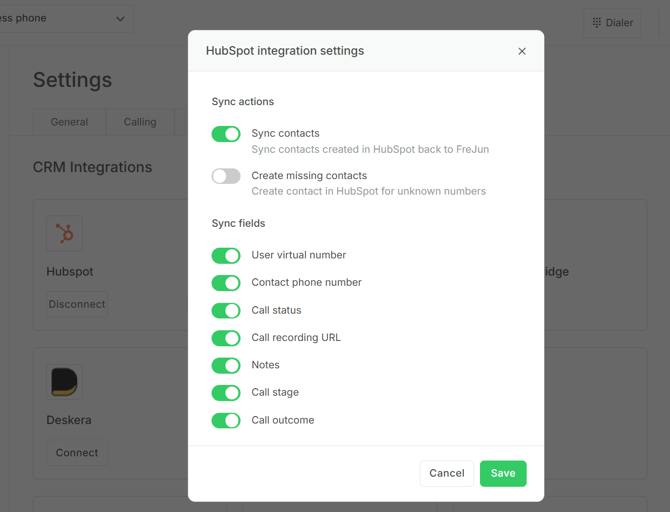
Once enabled, your contacts will start syncing automatically between HubSpot and FreJun.
For more queries, feel free to reach us at support@frejun.com or connect with us via Live Chat Support through your FreJun account.
👉 Start Using FreJun with HubSpot: https://product.frejun.com/signup