
Step 1- Check Incoming Call Permission
Incoming call access is mandatory for receiving calls on FreJun.
The user can verify this by navigating to: Settings > Calling
Check that both Incoming and Outgoing access are enabled for your account. If incoming access is missing, please contact your Admin to enable it.
Refer- How to Route Incoming Calls to a Specific User in FreJun?
Step 2- Check Chrome Extension Status
Ensure the FreJun Chrome Extension is:
- Installed on your browser
- Correctly logged in with your FreJun credentials
- Set as Available and not Away
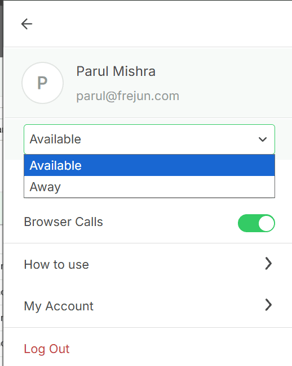
You can verify this by clicking the extension icon in your Chrome toolbar.
Step 3- Check the Dialing Prefix
When calling a FreJun virtual number, the country code prefix is mandatory.
Calls without the correct prefix will not connect.
Always dial using the full international format:
| Region | Correct Format | Incorrect Format |
|---|---|---|
| India | +91XXXXXXXXXX | 0XXXXXXXXXX or XXXXXXXXXX |
| UAE | +971XXXXXXXXXX | 0XXXXXXXXXX or XXXXXXXXXX |
| Other regions | +[Country Code]XXXXXXXXXX | Without country code |
Step 4- Reinstall the Chrome Extension
If the above steps check out, try a clean reinstall:
- Remove the existing FreJun Chrome Extension
- Reinstall it from the Chrome Web Store
- Log back in with your FreJun credentials
- When prompted, allow all permissions
- Ensure access to all sites is enabled — without this, the calling pop-up may be restricted on certain pages.
Refer- How to install the Chrome extension?
Step 5- Check Chrome Site Permissions
Chrome can sometimes restrict or revoke permissions after an update, which may prevent incoming call pop-ups or audio from working even when the call reaches the account.
To check:
- Open the FreJun tab in Chrome and click the 🔒 padlock icon in the address bar.
- Go to Site settings.
- Ensure both Microphone and Notifications are set to Allow for FreJun.
- Refresh the FreJun page and stay logged in.
- Test the incoming call again.
Step 6 — Check Your Availability Settings
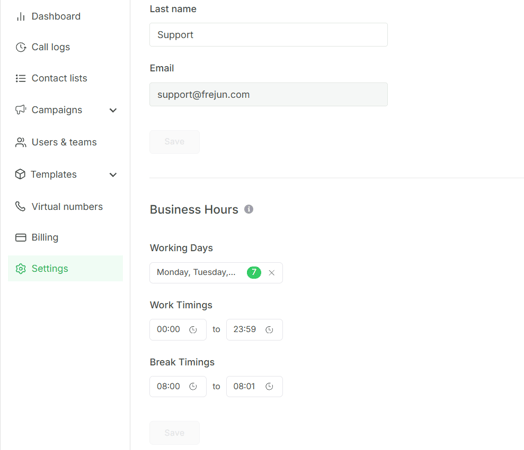
- Go to Settings > General
- Check your Business Hours for the current day/time
[CONFIRM: exact field location] - If you're marked unavailable, incoming calls are being disconnected and logged as missed by design, not by fault
👉 Still Not Receiving Calls After All Steps?
If the issue persists after completing all the above steps, please reach out to us at
- 📧 support@frejun.com
- 💬 Live chat via your FreJun account
: Please include when contacting us:
- Your virtual number and its status per Step 1
- Whether it's one user or your whole team
- Whether the issue is constant or intermittent
Our team will investigate further and assist you on priority.