
Step 1: Click on Upgrade
At the top bar of the product, click the green “Upgrade” button.

Step 2: Choose Your Plan
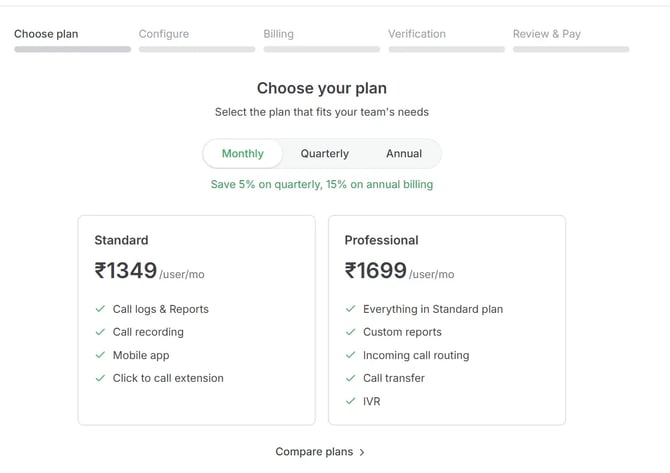
Select the plan that best suits your requirement:
- Standard
- Professional
Choose the preferred billing cycle:
- Monthly
- Quarterly → 5% discount
- Yearly → 15% discount
 Step 3: Configure the Plan
Select your plan and click Configure Plan.
Once selected, you will be redirected to the plan configuration page.
Here, you can:
- update license count
- select add-ons
- review pricing
Step 4: Download Proforma Invoice (Optional)
On the plan configuration page, you will find an option to Download Proforma Invoice.
This invoice is:
- valid for 30 days
- can be shared with your finance / procurement team for approval
Once approval is received, please proceed with the same flow and complete the payment.
Note: We strongly recommend completing the purchase directly through the product instead of bank transfer, as this helps us activate and set up your account faster.
Step 5: Continue to Billing
Click Continue to Billing
Fill in the billing details carefully:
- Company Name
- Billing Address
- State
- PIN Code
- GSTIN
- Billing Contact Number
Please ensure these details are accurate, as the same information will appear on your tax invoice.
Step 6: Verification
Proceed to the Verification step.
Please upload / submit the required verification documents as prompted on the screen.
6.1 Jurisdiction Declaration
Customer selects the applicable jurisdiction:
- India
- UAE
- United States
Jurisdiction selection governs:
- Required identity documents
- Verification ruleset
- Agreement template selection
6.2 Identity Verification via AU10tix Integration
Integration
- Embedded AU10tix hosted verification flow
For Individuals (KYC):
- Government-issued ID upload
- Live selfie with liveness detection
- Face match with ID
For Businesses (KYB):
- Certificate of Incorporation / Trade License
- Tax identification document (PAN / EIN / TRN)
- Authorized signatory ID verification
- Proof of authority validation
6.3 System Outcome
- PASS: Customer proceeds further in onboarding
- REVIEW: Customer is temporarily restricted and flagged for compliance review
Step 7: Review & Pay
Once verification is completed:
- review the plan details
- confirm billing information
- proceed with payment
After successful payment, your account will be upgraded to a paid INR plan.
Please feel free to reach out to sales@frejun.com to know more details.