
To Enable AI Insights and Call Transcript Sync :-
-
Log in to the FreJun Web App.
-
Go to Settings.
-
Navigate to Integrations.
-
Select Zoho Integration.
-
Open the Zoho Settings modal.
-
Enable the following toggles:
-
Call Insights and Call Transcript
-
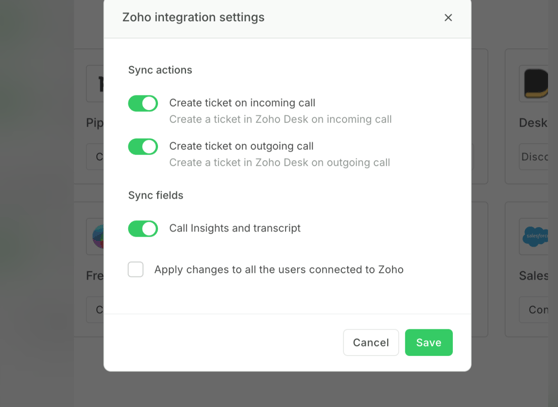
Once these toggles are enabled, AI insights and call transcripts will automatically start syncing to Zoho for completed calls.
This helps teams understand the call discussion quickly and improves follow-ups.
Where will the AI Insights and Call Transcript appear in Zoho?
After the feature is enabled and a call is completed:
-
The AI Insights and Call Transcript will automatically sync to Zoho Desk.
-
They will appear in the Conversations section of the ticket.
-
This is the same location where call notes are normally displayed.
This makes it easier for support or sales teams to quickly review what happened during the call.
For more Queries, reach out to us at support@frejun.com or Live chat support through your FreJun Account.