Availability :-
- Available only on Professional and Enterprise plans.
- Not available on Standard plan.
____________________________________________________________________
How to enable AMD ?- Go to the Virtual Number section.
- Select the relevant virtual number.
- Open the General tab.
- Enable Answering Machine Detection.
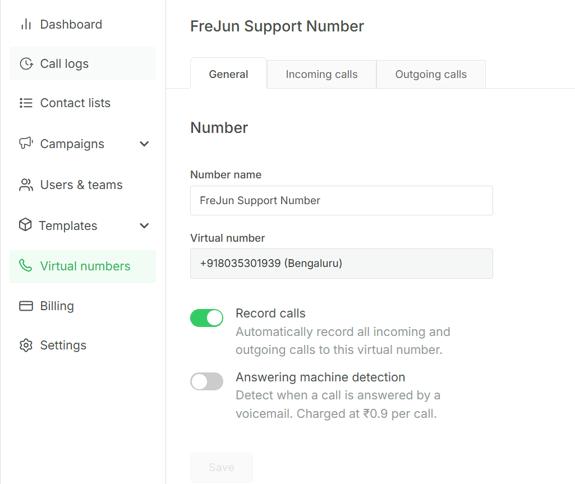
- Click on Save
AMD is configured per virtual number, not at the org level or individual user level. Each number must be enabled separately if AMD is needed across multiple numbers.
__________________________________________________________________
| Currency | Rate per call |
|---|---|
| USD | $0.009 |
| INR | ₹0.9 |
Since AMD is opt-in, customers are only billed on numbers where they've explicitly enabled it — there should be no surprise charges.
For more Queries, reach out to us at support@frejun.com or Live chat support through your FreJun Account.